October 2026: simpler uploads, better logs, multiple queues, and Vapor migrations

- Simpler file uploads with Laravel: upload large files from the browser to S3 with a new helper
- Multiple queues with Laravel: native support for multiple SQS queues and their workers
- Migrating from Laravel Vapor
- Logs and deployments in the terminal: new
bref logsandbref deploymentscommands - Logs of a single request
- Clearer errors when a deployment fails
- bref.sh is easier to use for AI agents
- Heads up: new AWS sign-up: the simpler AWS accounts are too limited to work well with Bref
- Also shipped: smaller fixes, regions and extensions
Simpler file uploads with Laravel
Lambda limits HTTP requests to about 6 MB, so large files can’t go through your application. The solution is to upload them from the browser straight to S3, and bref/laravel-bridge 3.1 makes it much simpler:
- a route that generates presigned upload URLs (protected by an
uploadFilesgate) - a JavaScript helper,
bref-upload, that uploads the file to S3 with progress - an
UploadedToS3validation rule
import { upload } from 'bref-upload';

const { key } = await upload(file, {
    progress: (ratio) => console.log(`${Math.round(ratio * 100)}%`),
});
// Send `key` to your backend with the rest of the form
$validated = $request->validate([
'file' => ['required', new UploadedToS3(extensions: ['pdf'], maxSize: 10 * 1024 * 1024)],
]);
Storage::copy($validated['file'], "documents/{$document->id}.pdf");The helper has no dependency and works with Blade, Inertia (Vue or React), or anything else. If you come from Vapor, it replaces Vapor.store() with the same flow.
Docs: bref.sh/docs/laravel/file-storage#large-files
Multiple queues with Laravel
The Laravel queues documentation now covers several SQS queues, the Laravel way: dispatch jobs with onQueue('emails'), and map queue names to the SQS queues:
if ($stack = config('bref.stack_name')) {
    Queue::forward([
        'emails' => "$stack-emails",
    ], connection: 'sqs');
}
Docs: bref.sh/docs/laravel/queues#multiple-queues
Migrating from Laravel Vapor
There is now a complete guide to move a Laravel application from Vapor to Bref: bref.sh/docs/laravel/migrating-from-vapor
Logs and deployments in the terminal
The bref CLI can now show your application’s logs and deployments:
# Logs of the last hour
bref logs

# Errors of the last day, in the web function
bref logs --env=prod --since=1d --function=web --search=error

# Latest deployments, and the logs of the last one
bref deployments --env=prod
bref deployments:logs --env=prod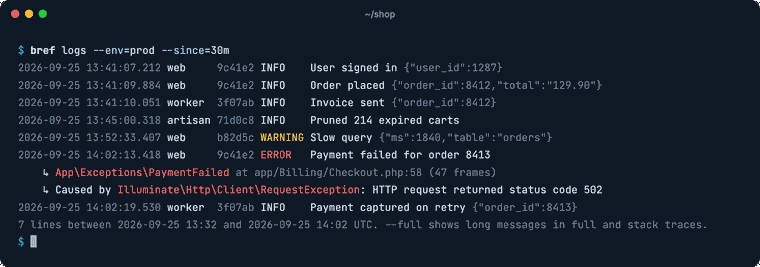
Noisy lines (the ones Lambda and PHP-FPM write on every request) are hidden by default, --all shows them. Monolog logs are parsed: you get the level, the context, and exceptions reduced to their class and location (--full shows the stack trace).
It also works well with AI coding agents like Claude Code, Cursor or Codex: the CLI detects when an agent runs it and adapts its output.
bref command got the same treatment: the log lines in its output now look like bref logs instead of raw JSON, and Laravel and Symfony commands now display with colors in the terminal and in the dashboard.
Docs: bref.sh/docs/environment/logs#reading-logs
Logs of a single request
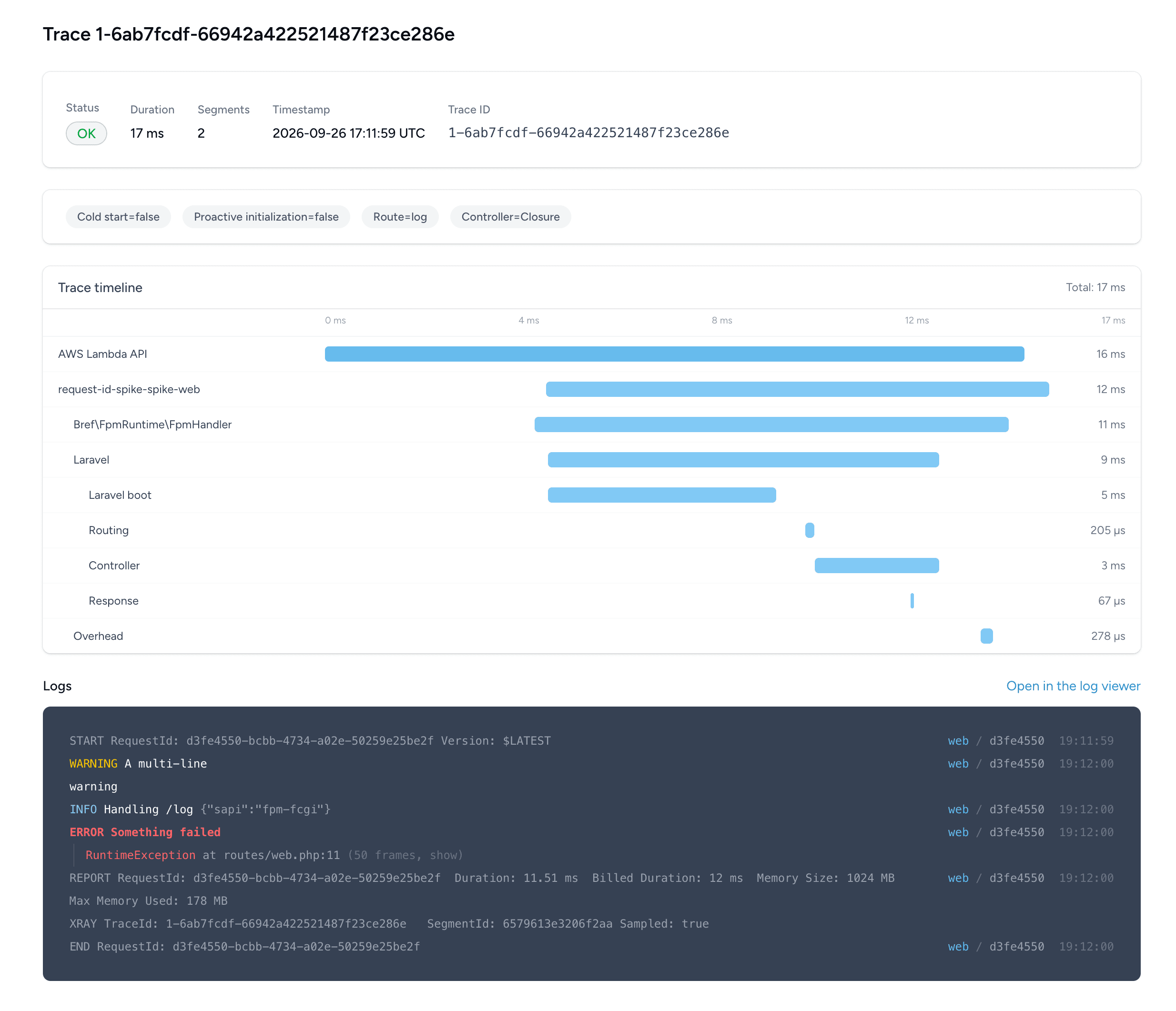
With the latest Bref packages, Laravel and Symfony logs include the ID of the Lambda invocation (the HTTP request, the job, or the command). That makes it possible to view all the logs of a single request.
In the dashboard, the short request ID is shown next to each log line. Click it to see all the logs of that request, with its duration, the memory it used, and a link to its X-Ray trace.
X-Ray traces also show the logs of their invocation, below the timeline:
From the terminal, filter with the request ID (the first 8 characters are enough):
bref logs --env=prod --search=8f507cfc --allSymfony users: if your application installed bref/symfony-bridge before 3.0.2, Symfony Flex did not register the bundle that enables Bref’s log formatter, so your logs don’t have the request ID. Update to 3.0.2 and add this line to config/bundles.php:
Bref\SymfonyBridge\BrefSymfonyBridgeBundle::class => ['all' => true],(If you already registered Bref\SymfonyBridge\BrefBundle by hand, it keeps working.)
Docs: bref.sh/docs/environment/logs#logs-of-a-single-request
Clearer errors when a deployment fails
When a serverless.yml deployment fails, Bref Cloud now finds the actual error in the deployment logs and shows it at the top of the deployment page (and in bref deployments:logs). Before, you often got a line like CREATE_FAILED: HelloLambdaFunction (AWS::Lambda::Function), and the reason from AWS was buried further down in the logs.
Two common failures also come with a hint on what to do: a package above Lambda’s 250 MB limit, and “The role defined for the function cannot be assumed by Lambda” (IAM isn’t ready yet, deploying again fixes it).
This also helps AI agents. When an agent deploys with bref deploy, the actual error is now in the terminal output (and in bref deployments:logs). Combined with bref logs, it can figure out why a deployment or a request failed and fix it, without opening the dashboard or CloudWatch.
bref.sh is easier to use for AI agents
bref.sh/llms.txt lists every documentation page, bref.sh/llms-full.txt contains the whole documentation in a single file, and every page is available as Markdown (add .md to its URL). Useful if you point Claude Code, Cursor or Codex at the docs.
Heads up: new AWS sign-up
AWS now has a second sign-up form , “Sign up for AWS (new)”, where you log in with Google, GitHub, Apple or Amazon. It creates an “AWS project”: a restricted AWS account managed by AWS, with policies you cannot change. Bref Cloud cannot connect to these accounts and other restrictions apply, for example which regions you can use. When you create an AWS account, use the classic “Sign up for AWS (advanced)” instead.
Details: bref.sh/docs/setup#aws-projects
Also shipped
bref deployno longer fails after a successful deployment whenFORCE_COLORis set (some CI systems and coding agents set it). Update the CLI to 1.3.1 or later.- Lambda’s 250 MB limit includes the layers: Bref’s PHP layer takes about 80 MB, which leaves roughly 170 MB for your code (docs).
- Bref Cloud networks and databases now work in
ca-central-1andus-west-1, and short internal hostnames now resolve in networks outsideus-east-1. - Lambda functions now get a
BREF_STACK_NAMEenvironment variable (Bref 3.0.11), available in Laravel asconfig('bref.stack_name')(laravel-bridge 3.1.1). - osls 4.4 supports CloudFormation express mode (
provider.deploymentMode: express) for faster deployments of development stages. - New extensions: gmp and igbinary for PHP 8.5, and mongodb updated to 2.5.2.
The detailed Bref Cloud changelog is here: bref.cloud/changelog