Bref 3.0 is released 🎉

Bref 3.0 is here! Since Bref 2.0, we've grown from 10 billion to 40 billion Lambda executions (aka requests) every month. The package has been installed more than 9 million times, and we've reached 4,000 commits across all Bref repositories.
Today, we celebrate these achievements and the release of Bref 3.0 🎉
Let's check out what's new in v3.
Bref 3.0
Here's a summary, we'll dive into the details below:
- 24% smaller layers for faster cold starts.
- Runtimes rebuilt on Amazon Linux 2023: upgraded from Amazon Linux 2.
- PHP 8.5 support
- PostgreSQL extension is now enabled by default.
- Redis extension is now built-in.
- Unified PHP runtime: one layer and one container image instead of three.
- New regions:
ap-southeast-3andme-central-1. - Better CloudWatch logs with the new Monolog formatter enabled by default.
- Lambda request ID and trace ID exposed as environment variables for easier logging.
- Simpler Laravel onboarding with a new
serverless.ymltemplate. - Bref Cloud (opens in a new tab): private networks, application diagrams, and request tracing.
What did we break? Almost nothing, the upgrade should be smooth. Here's an overview:
- PHP 8.2+ is now required (PHP 8.0 and 8.1 support is dropped).
- The
vendor/bin/brefCLI is removed (it was already 90% removed in v2). - The SOAP extension is now opt-in (it had very little usage).
- If you deploy using container images, you'll need to update your Dockerfile.
- If you use
bref/extra-php-extensions(opens in a new tab), update it from v1 to v3 (there's no v2, versions are aligned with Bref now).
For a complete list of changes and instructions, check out the v3 upgrade guide.
Faster Lambda cold starts
The Bref layers for AWS Lambda have been optimized and their size reduced. This leaves more room for your code and should improve cold start times.
- PHP 8.4: 69MB → 53MB
- PHP 8.3: 65MB → 46MB
This was achieved through plenty of tests leading to these optimizations:
- Stripping debug symbols from all libraries and PHP extensions.
- Compiling PHP with size-optimization flags.
- Disabling the rarely-used SOAP extension by default.
- Bundling some PHP extensions directly into the PHP binary.
Amazon Linux 2023
Bref 3.0 is built on Amazon Linux 2023 (opens in a new tab) (AL2023), the latest version of Amazon's Linux distribution for AWS.
The previous Bref versions were built on Amazon Linux 2 (AL2), which is reaching end of life soon. AWS Lambda will continue to support AL2 for some time, but it's recommended to migrate to AL2023 as soon as possible.
This upgrade brings several benefits:
- Performance: AL2023 is leaner than AL2, with more recent kernel and system libraries.
- Modern packages: AL2023 ships with more recent package versions, simplifying the Bref build process.
- Long-term support: AL2 will be deprecated in June 2026, while AL2023 will be supported at least until 2029.
The migration happens automatically when you upgrade to Bref 3.0, no changes are needed on your end.
PHP 8.5 support
Bref 3.0 adds support for PHP 8.5 (which depended on an AL2023 system upgrade). You can start using it by setting the runtime in your serverless.yml:
functions:
    api:
        handler: public/index.php
        runtime: php-85-fpm
Redis extension built-in
The Redis extension is now included in Bref layers by default. Redis is one of the most used extensions by Bref users for caching and session storage.
If you were using the Redis extension from bref/extra-php-extensions (opens in a new tab), remove the layer from your serverless.yml:
functions:
    api:
        # ...
        layers:
-            - ${bref-extra:redis-php-84}
And enable the extension via a php.ini file in your project (php/conf.d/php.ini):
extension=redisIf Redis was the only bref/extra-php-extensions extension you were using, you can uninstall the package:
composer remove bref/extra-php-extensionsPostgreSQL enabled by default
The PostgreSQL PDO extension is now enabled by default. If you're using PostgreSQL, you no longer need any additional configuration.
If you had enabled it manually via a php.ini file, you can remove that line:
-extension=pdo_pgsqlUnified PHP runtime
Bref 3.0 consolidates the three separate layer types (function, FPM, console) into a single unified layer per PHP version. This simplification makes maintenance easier and provides a simpler mental model for users.
Do you need to change anything?
- If you use
runtime: php-xxxinserverless.yml(for exampleruntime: php-84-fpm): no changes are needed! - If you deploy using container images: you need to update your
Dockerfile, ⚠️ read the upgrade guide. - If you specify layers explicitly: ⚠️ read the upgrade guide.
A single layer/image is how it should have been from the start, and I'm really glad we're getting there now!
Better CloudWatch logs
The Bref Monolog formatter (opens in a new tab) is now enabled by default in the Laravel and Symfony bridges. This formatter outputs logs in a format optimized for CloudWatch, making them easier to read and filter.
Before (plain text):
[2025-12-05 10:30:45] production.ERROR: Database connection failedAfter (structured format):
ERROR Database connection failed {"message":"Database connection failed","level":"ERROR","context":{...}}This format makes logs easier to read in CloudWatch and enables powerful filtering with CloudWatch Logs Insights (e.g., filter by log level or exception class).
Exception handling is also greatly improved: Previously, exception stack traces were split across multiple CloudWatch log records (one per line), making them difficult to read and browse. Now, the entire exception (including stack trace) is grouped in a single JSON object, making debugging much easier.
That new logging approach also lets you read all the logs of a single request, by filtering via the AWS request ID.
Lambda request ID and trace ID
Bref now exposes the Lambda request ID and X-Ray trace ID as environment variables on every invocation:
LAMBDA_REQUEST_ID: the current AWS Lambda request ID._X_AMZN_TRACE_ID: the AWS X-Ray trace ID.
These are useful for logging and tracing purposes, for example to group all logs of the same invocation in CloudWatch.
New regions
Bref layers are now available in two additional regions:
ap-southeast-3(Asia Pacific - Jakarta)me-central-1(Middle East - UAE)
The vendor/bin/bref CLI is removed
The vendor/bin/bref CLI has been completely removed in Bref 3.0. This is a minor change since the CLI was already 90% removed in Bref 2.0 - only the bref init command remained for bootstrapping new projects.
We now have better onboarding with improved documentation and the serverless CLI commands. Here are the alternatives:
- Scaffolding new projects: Follow the getting started guide (opens in a new tab) to create your
serverless.ymlmanually. - Layer versions: Visit runtimes.bref.sh (opens in a new tab) or run
serverless bref:layers. - Running console commands: Use
serverless bref:cli(this existed in v2). - Local development: Use Docker-based local development (opens in a new tab).
Improved Laravel onboarding
The serverless.yml template (opens in a new tab) that ships with the Laravel bridge has been greatly expanded to cover all the common building blocks of a Laravel application: HTTP API, artisan commands, SQS queues, S3 file storage, CloudFront CDN, database configuration, and more. Everything is documented with comments and links to the relevant documentation.
This should make the onboarding much simpler for new Laravel applications. If you have a Laravel application and are wondering what it would look like to run it on AWS Lambda with Bref, check out the new template (opens in a new tab) and the getting started guide (opens in a new tab) for Laravel.
Upgrading
Check out the v3 Upgrade Guide for a complete list of changes and instructions to upgrade your projects.
Bref Cloud
Launched in 2025, Bref Cloud (opens in a new tab) is the simplest way to deploy and monitor PHP applications on AWS Lambda. It replaces the AWS console with an intuitive dashboard to manage everything.
Here's an overview of the Bref Cloud features that launched recently:
Application diagrams with live metrics
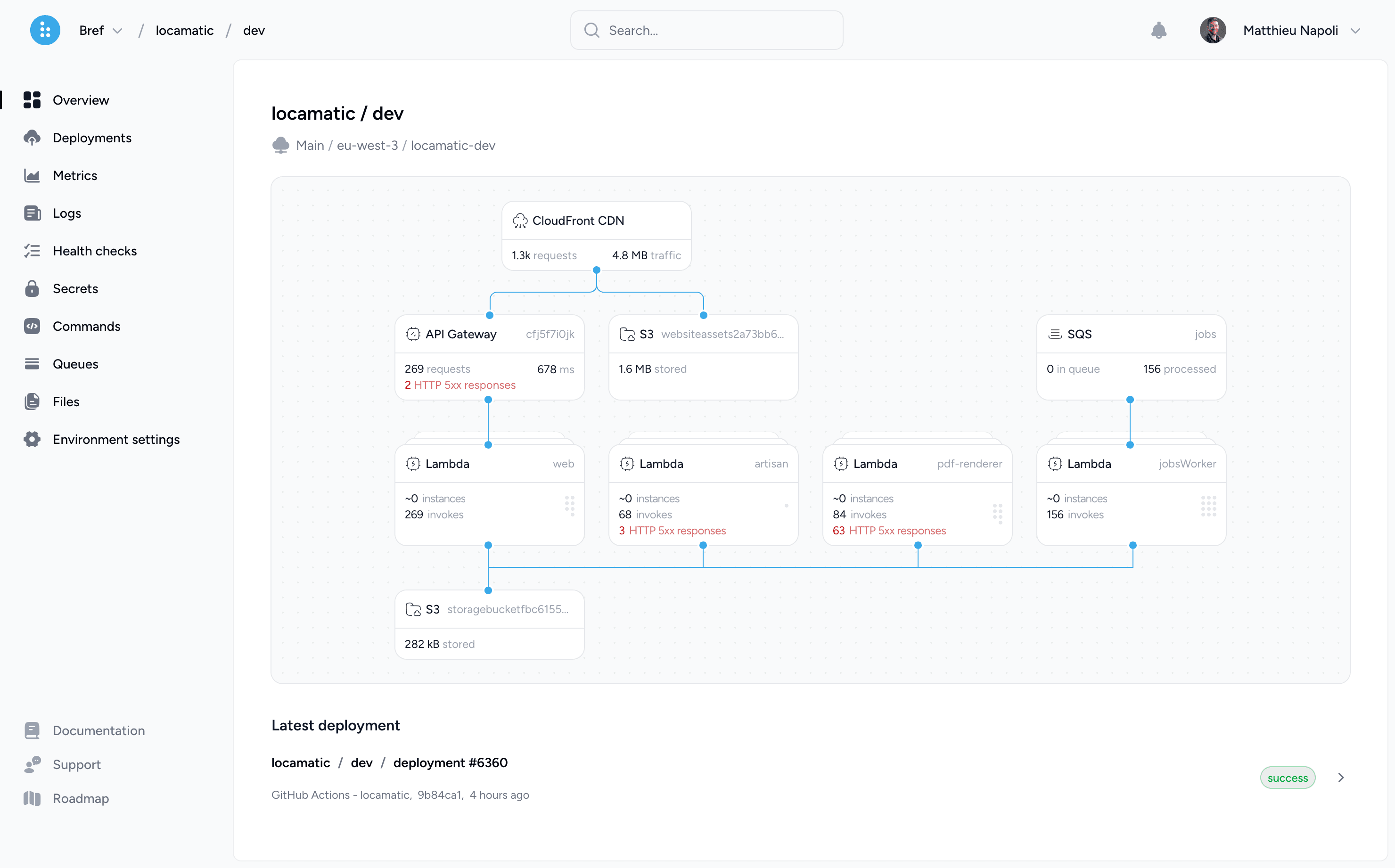
Bref Cloud now shows a diagram of your application's architecture: CloudFront CDN, API Gateway, Lambda functions, SQS queues, S3 buckets. All that with live metrics: number of requests, response times, queue depth, storage usage, and errors across every component.
Private networks and databases
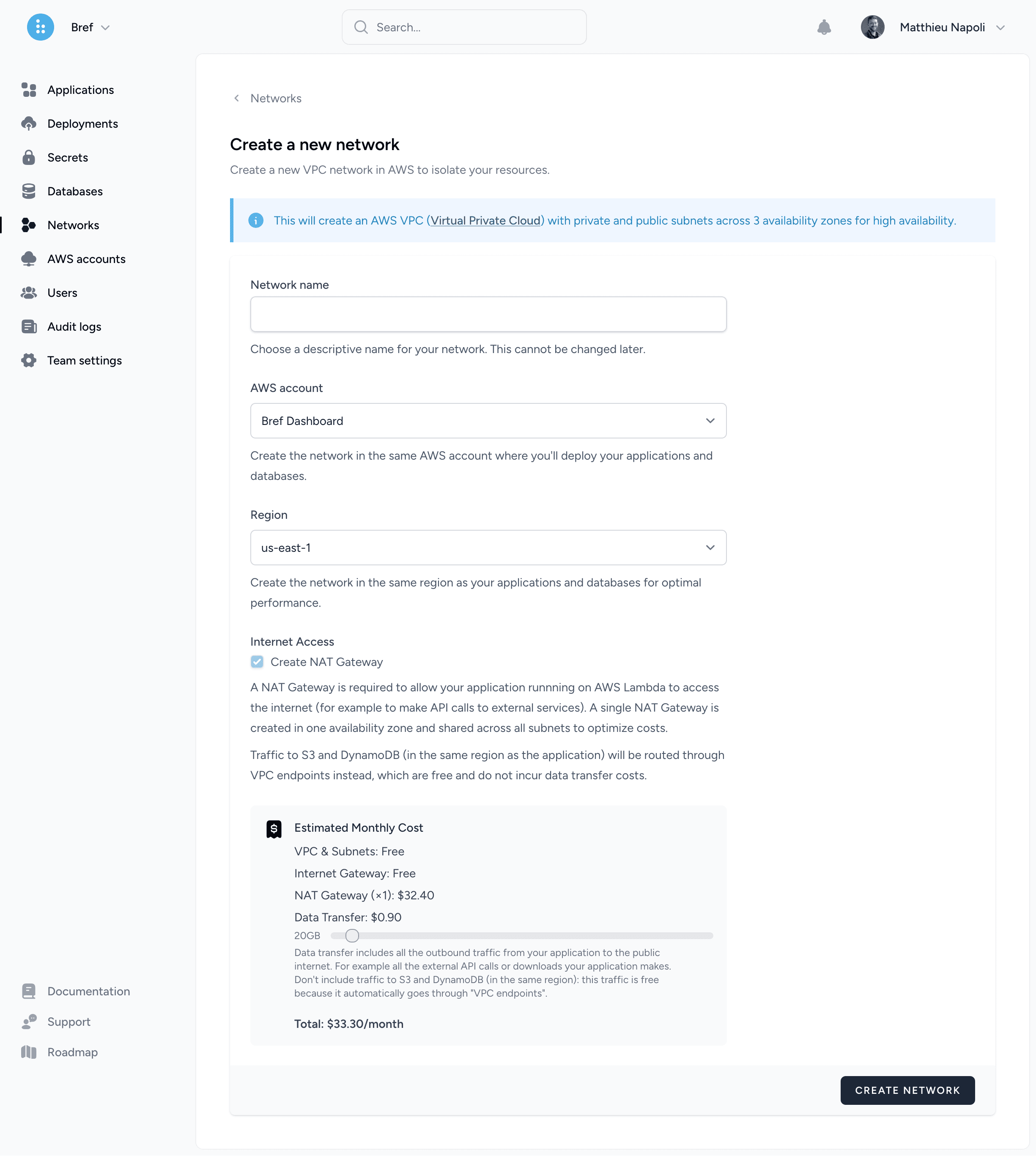
You can now create private networks (VPC) from Bref Cloud. No AWS networking expertise required: Bref Cloud handles the VPC configuration, subnets, security groups, and connectivity (like NAT Gateway) so your databases are only accessible from your Lambda functions.
X-Ray performance tracing
With the release of Bref v3, I am super happy to release tracing support in Bref Cloud via X-Ray.
Bref already provided an X-Ray integration via an extra package. This integration is now available for free to all Bref Cloud users: set it up and start tracing your PHP code.
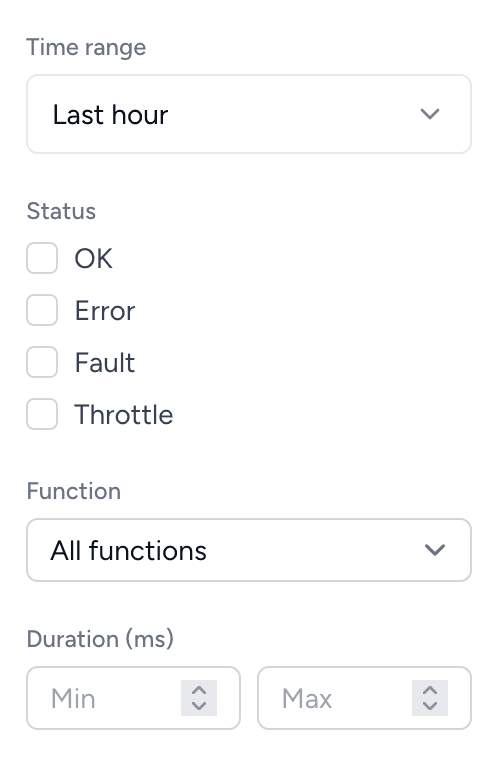
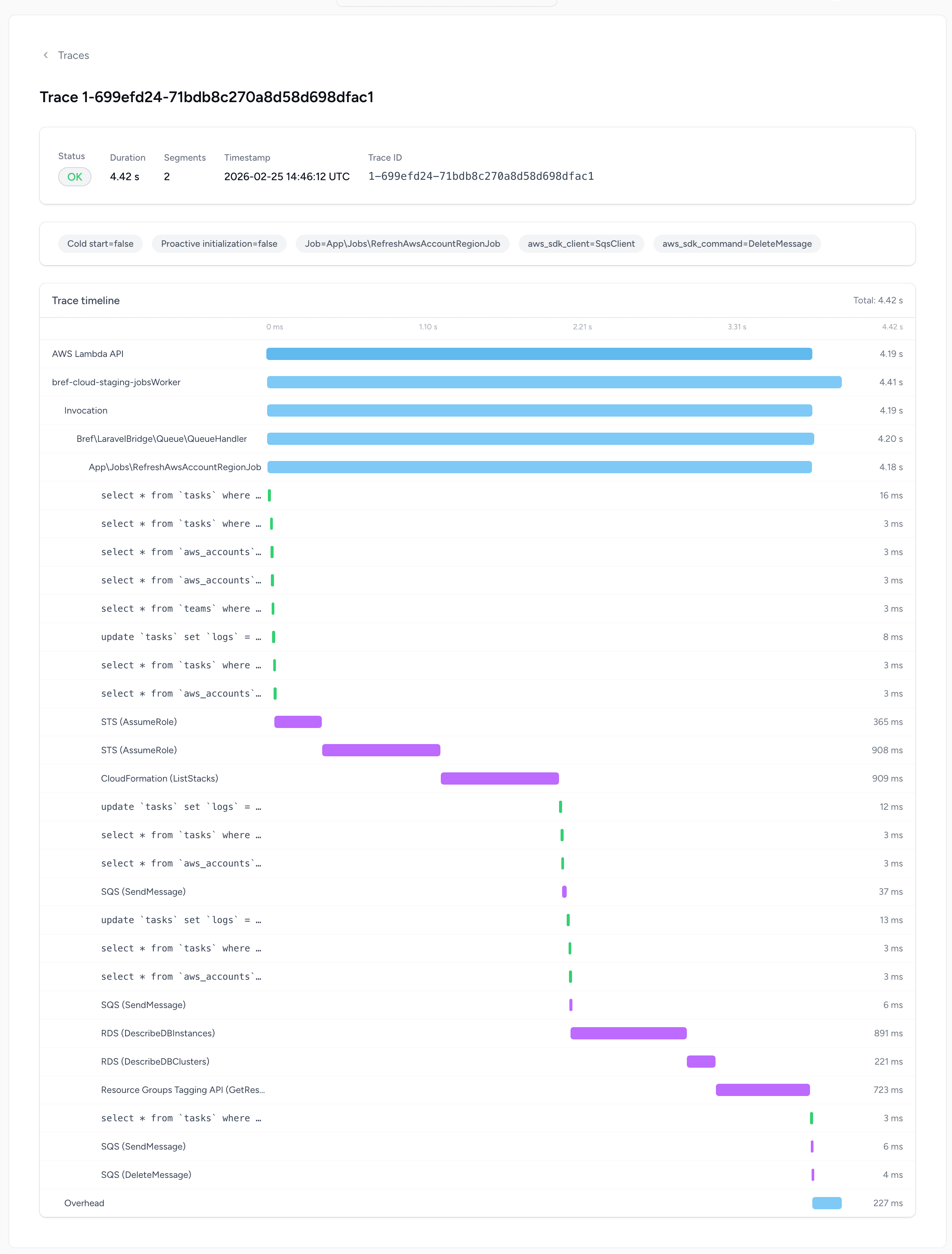
Once set up, Bref Cloud lets you explore X-Ray traces with a simple UI. Unlike AWS's native X-Ray console, which is generic and complex, Bref Cloud's UI is designed specifically for PHP: you can filter traces by controller, route, CLI command, or job class, and quickly drill down into individual requests to find bottlenecks.
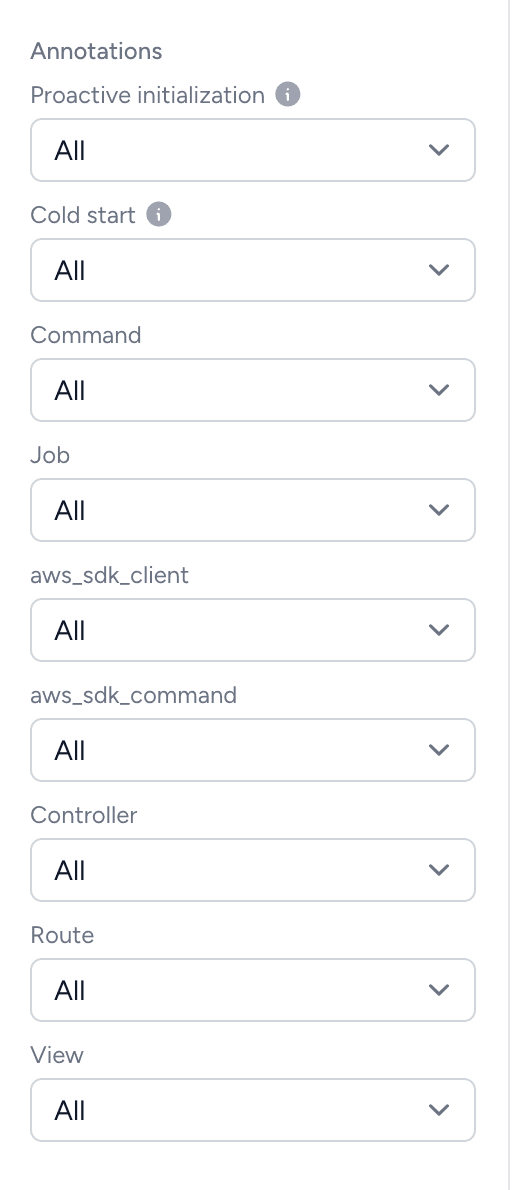
Traces are enriched by Bref with annotations to understand where time is spent in your application: cold starts, database queries, HTTP calls, AWS SDK calls, and more:
Combined with the improved CloudWatch logs and the Lambda request ID exposed in Bref v3, Bref Cloud gives you complete observability for your serverless PHP applications out of the box.
Learn more about Bref Cloud →
Community Serverless Framework
While not directly related to Bref v3, this is worth mentioning: the original Serverless Framework (opens in a new tab) is no longer fully open-source with its v4 and requires a paid license. Since most of the Bref community relies on the serverless CLI to deploy their applications, this was a problem for many.
That's why we now maintain a community fork of Serverless Framework v3 (opens in a new tab), which is fully open-source (MIT) and free to use without any limitations. The fork is stable, mature, and actively maintained by Bref maintainers and the community. It includes security fixes, dependency updates, and up-to-date support for new AWS Lambda runtimes.
On top of that, the CLI has been made lighter and faster by removing obsolete features like the Serverless Dashboard integration and Tencent Cloud support.
Migration is straightforward since it's a drop-in replacement:
npm remove serverless
npm install -g osls
No changes to your serverless.yml or project configuration are needed. The CLI command remains serverless (or osls if you want to have both the old and new CLI).
We recommend all Bref users to migrate to this fork.
New observability packages
Also not part of Bref v3, but worth mentioning: two new packages were released in 2025 to help monitor PHP applications on AWS Lambda:
- Bref X-Ray (opens in a new tab): integrates AWS X-Ray with Bref for performance monitoring and distributed tracing. It tracks cold starts, database queries, HTTP calls, AWS SDK calls, and more. It supports both Laravel and Symfony.
- Bref Sentry (opens in a new tab): extends Sentry's capabilities for AWS Lambda, capturing errors outside of PHP-FPM (such as timeouts or oversized responses), adding exception tracking to event-driven handlers (SQS, EventBridge, S3…), and tracking cold starts and AWS SDK calls.
These are commercial packages (not part of the open-source project) that help fill the observability gap for serverless PHP.
Thanks
A huge thanks to the Bref contributors (opens in a new tab), to the community for supporting the project, and to the open-source sponsors:
Premium sponsors:
Gold sponsors:
- Depot (opens in a new tab)
- SecuMailer (opens in a new tab)
- Ecomail (opens in a new tab)
- Spreaker (opens in a new tab)
- Runs On (opens in a new tab)
- Playable (opens in a new tab)
And many other personal sponsors (opens in a new tab)!
Thank you all!
That's it!
I hope you enjoy Bref v3!
If you want to support the project, consider sponsoring on GitHub (opens in a new tab), subscribing to Bref Pro support, or trying out Bref Cloud. Bref has been thriving for 8 years thanks to the support of the community, and I hope it will continue to thrive for many more years to come ❤️
There is a complete v3 Upgrade Guide that you can follow.
Head to the docs to get started with Bref, or check out the documentation for Laravel or Symfony.
You can also join the community in Slack, post details about your project in Built with Bref (opens in a new tab), or share your experience online and mention @brefphp (opens in a new tab) on Twitter.